
I have just finished the resits for my finals (after failing them so impressively last time). I don’t know whether I pass until Monday, so for now I get to be geeky normal me again.
So, I would like to introduce my latest purchase, the excellent, non crashy and productivity increasing Display Fusion Pro. It‘s a multi monitor taskbar. To the vast majority of you, this will mean very little, but to those of you who use more than one screen with Windows, its a godsend.
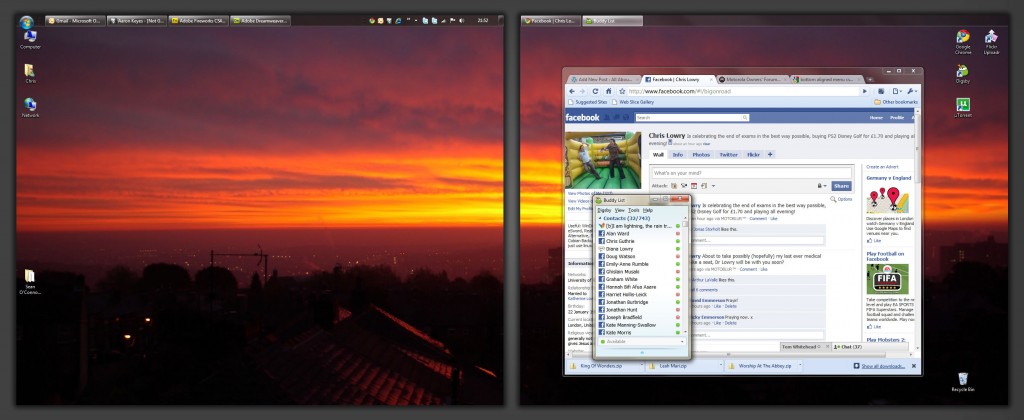
Cool features:
- Can be arranged, sized and styled like the normal Windows taskbar.
- Automatically only shows the programs open on the relevant window, and takes them off the main taskbar.
- Allows multiple wallpapers, random changes or just a single wallpaper stretched across 57 screens (probably).
- Only £15.62
My only regret with this program is that it’s necessary. I had hoped that 10 years after XP, Microsoft would have provided better multiple monitor support out of the box. And its not like at least 357 people agree with me.
Anyway, check out the software at http://www.displayfusion.com/ – there’s a 30 day trial, so you can see that I am right, and you cannot realistically live without this software – unless Microsoft actually listen to consumers, but me and 211,416 other people think that seems unlikely.
Update
Jon Tackabury, the owner and lead developer of all the Binary Fortress software has posted a link to this on his twitter feed. Check him out at twitter.com/jtackabury.
Another update
The license agreement has been updated, with free, standard, personal pro and company pro licenses. Cheers to Jon for the free upgrade!
Windows is my favorite OS……NOT!
Fair enough, but to be fair I’ve often found ubuntu taskbar even harder to customise!
Did you try Actual Multiple Monitors (http://www.actualtools.com/multiplemonitors/)?
I checked Ultramon, Display Fusions, and Actual Multiple Monitors, and finally I chose AMM.
The most important feature for me is an additional taskbar it adds on my second monitor that has all features of main taskbar like Start button, toolbars, clock and tray area with notification icons. Even more, it has Pin to Taskbar and Grouping feature of Windows 7.
I don’t need the extra Start button. Grouping similar tools would be interesting.
Ultimately, I went on most of the sites, and the screenshots on Display Fusion looked best. Then I tried it and found it was excellent so didn’t try AMM. I did try Ultramon and wasn’t impressed.
Display Fusion have been awesome at upgrading though, so I suspect they will add the other features in time.